


Qiata 6.0
Secure File Exchange. Reimagined.
More modern, intuitive, and powerful: With Qiata 6.0, we are introducing a major evolution of our secure file exchange platform. Discover a redesigned user interface, enhanced TeamTransfer capabilities, and numerous improvements for users and administrators alike.
A New Chapter for Qiata
With Qiata 6.0, simple and secure collaboration takes center stage. The completely modernized web interface delivers a more intuitive user experience, while new features make managing files, TeamTransfers, and permissions easier than ever.
Administrators also benefit from significant enhancements: a new Design Wizard, expanded archiving and cleanup capabilities, and numerous optimizations provide greater flexibility and control.
Key Highlights at a Glance
TeamTransfer
New file management, individual folder permissions, and a significantly improved collaboration experience.
Redesigned Interface
A modernized interface featuring Light and Dark Mode, consistent dialogs, and mobile-friendly layouts.
Design Wizard
Centrally customize logos, colors, and text to create a consistent corporate identity.
Administration
Enhanced archiving, targeted cleanup operations, and greater control over TeamTransfers.
TeamTransfer: Collaboration Redefined
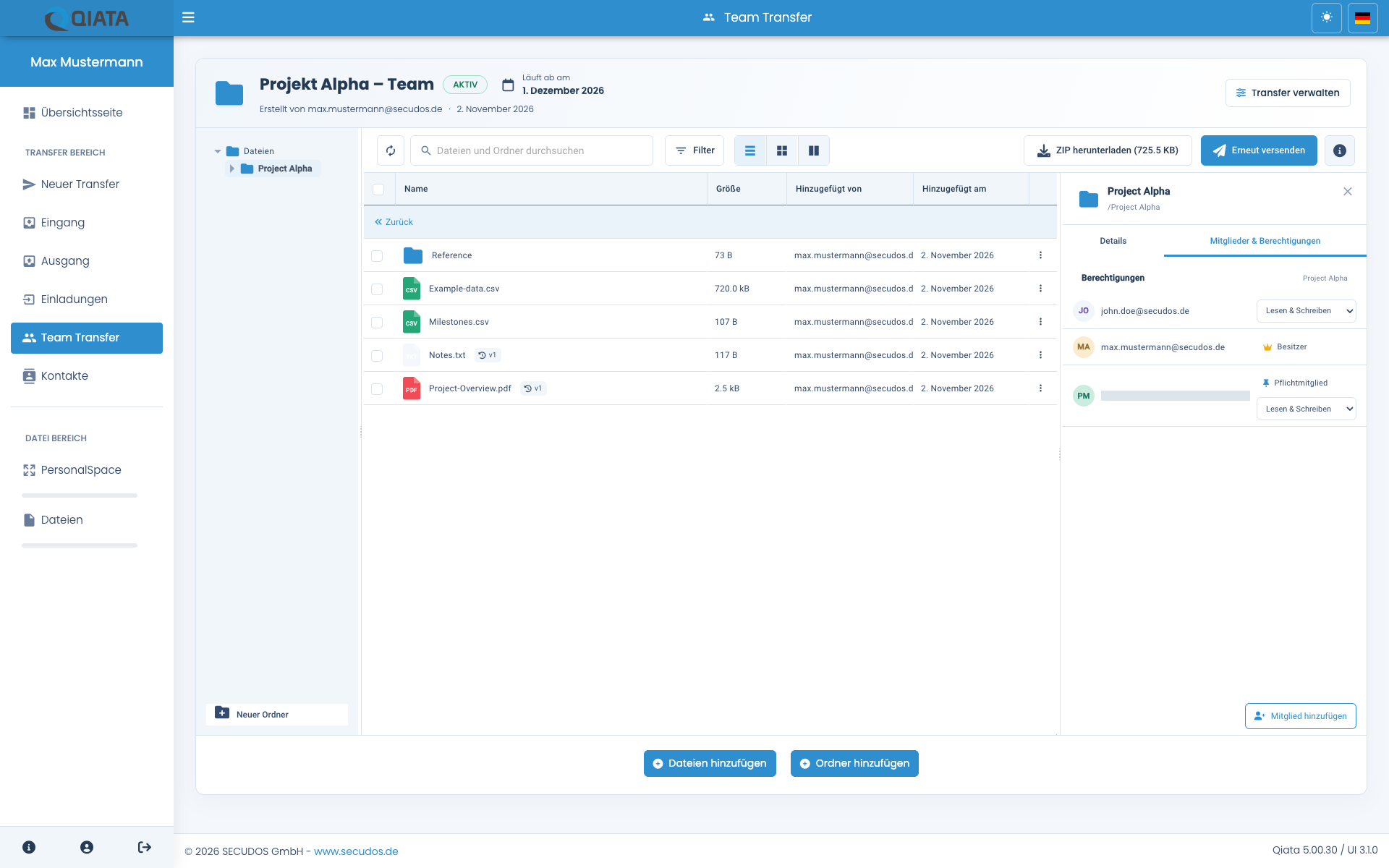
TeamTransfers are among Qiata's core features. With version 6.0, their usability and management capabilities have been significantly expanded. The new file manager combines a clear folder structure with powerful features for organizing files and collaborating efficiently.
Navigate through folders, quickly locate files using the integrated search, and take advantage of filters and different view options. Entire folder structures can now be conveniently uploaded using drag and drop.
Individual Permissions Down to Folder Level
One of the most important new features is granular permission management. Access rights can now be assigned individually for each TeamTransfer member at folder level.
The member cannot access the folder.
Read-only access to the shared folder contents.
Additional write permissions for collaborative work.
Permissions can be inherited by subfolders or defined individually for specific folders. Permission management is already available when creating a TeamTransfer and is also supported in the Outlook add-in.
Files and Activities Always in View
The new file manager provides direct access to file previews, version histories, and download activities. Upload statuses are updated automatically, indicating whether files are being processed, awaiting approval, or have been rejected.
The member overview has also been redesigned. Activities, notifications, and reminders are now presented more clearly. Email notifications respect individual folder permissions, while direct links provide access to the corresponding files.
In addition, titles and invitation messages can now be modified after creation, and expired TeamTransfers can be extended directly.
A Completely Redesigned User Interface
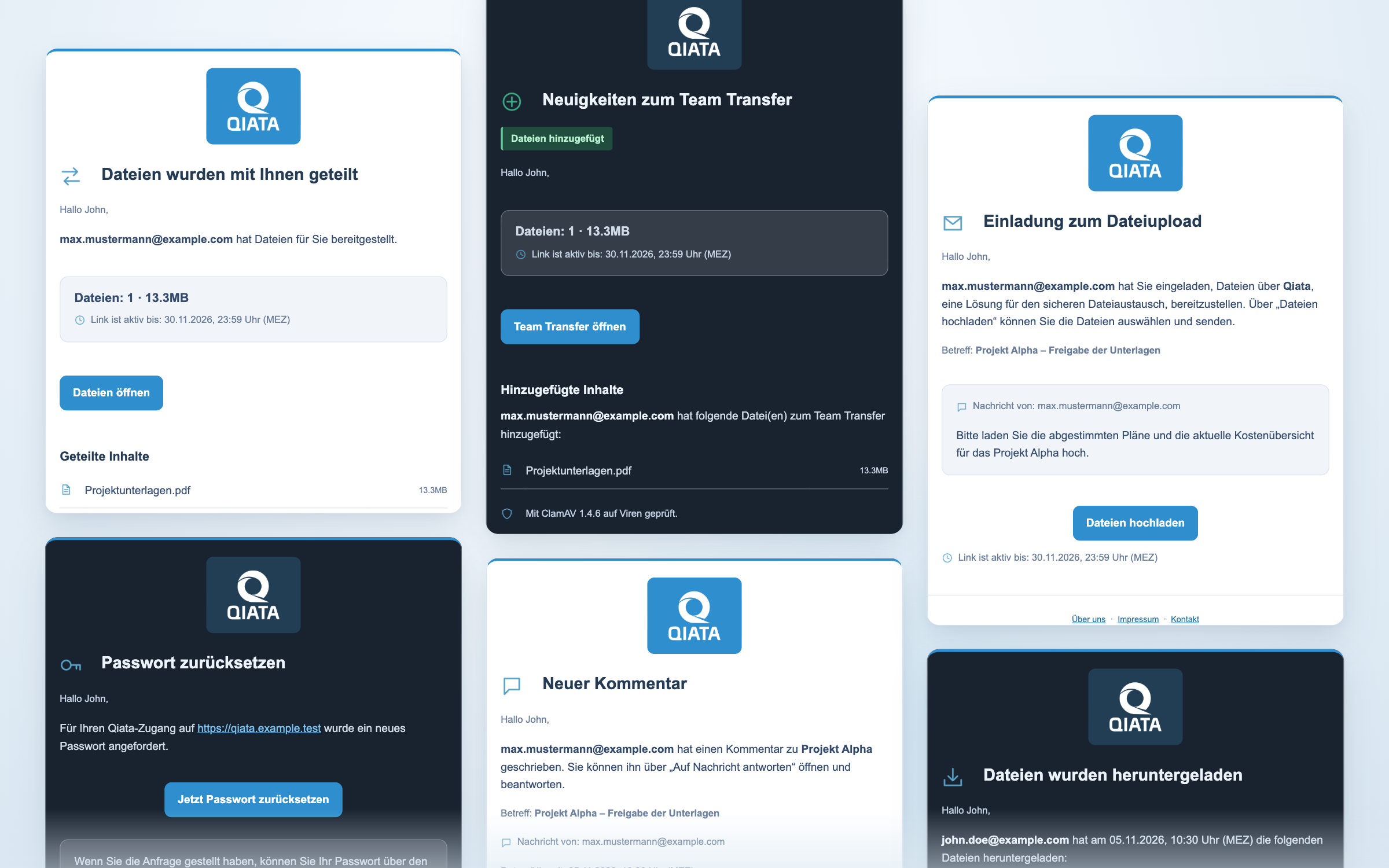
Qiata 6.0 introduces a comprehensive modernization of its web interface. The new design delivers a more consistent appearance, improved navigation, and a more comfortable user experience on both desktop computers and smartphones.
Light Mode and Dark Mode
Qiata now supports both light and dark appearance modes. The interface can also automatically adapt to the operating system's appearance settings, providing an optimal viewing experience for different working environments.
Consistent File Management
The "New", "PersonalSpace", and "Files" sections now share a unified file manager. Qiata also indicates whether a file has been selected locally or is already stored on the server, as well as which transfers reference the file.
Improved User Experience
The login page and external upload, download, and error pages have been completely redesigned. Login provider selection is now integrated directly into the login page.
Enhanced progress indicators provide information about transfer speeds, estimated remaining time, and upload progress. ZIP archives are generated in the background and become available for download once processing is complete.
The transfer history also offers additional filtering options based on search text, event type, and result.
Custom Branding Made Easier Than Ever
The new interactive Design Wizard makes adapting Qiata to your company's corporate identity significantly easier.
Logos, colors, and text can be configured centrally. Customizations apply to the login page, external pages, and the web interface. This allows administrators to create a consistent visual experience for both internal users and external communication partners.
Templates can now be previewed in desktop and smartphone layouts, as well as in both Light and Dark Mode.
Modernized Email Communication
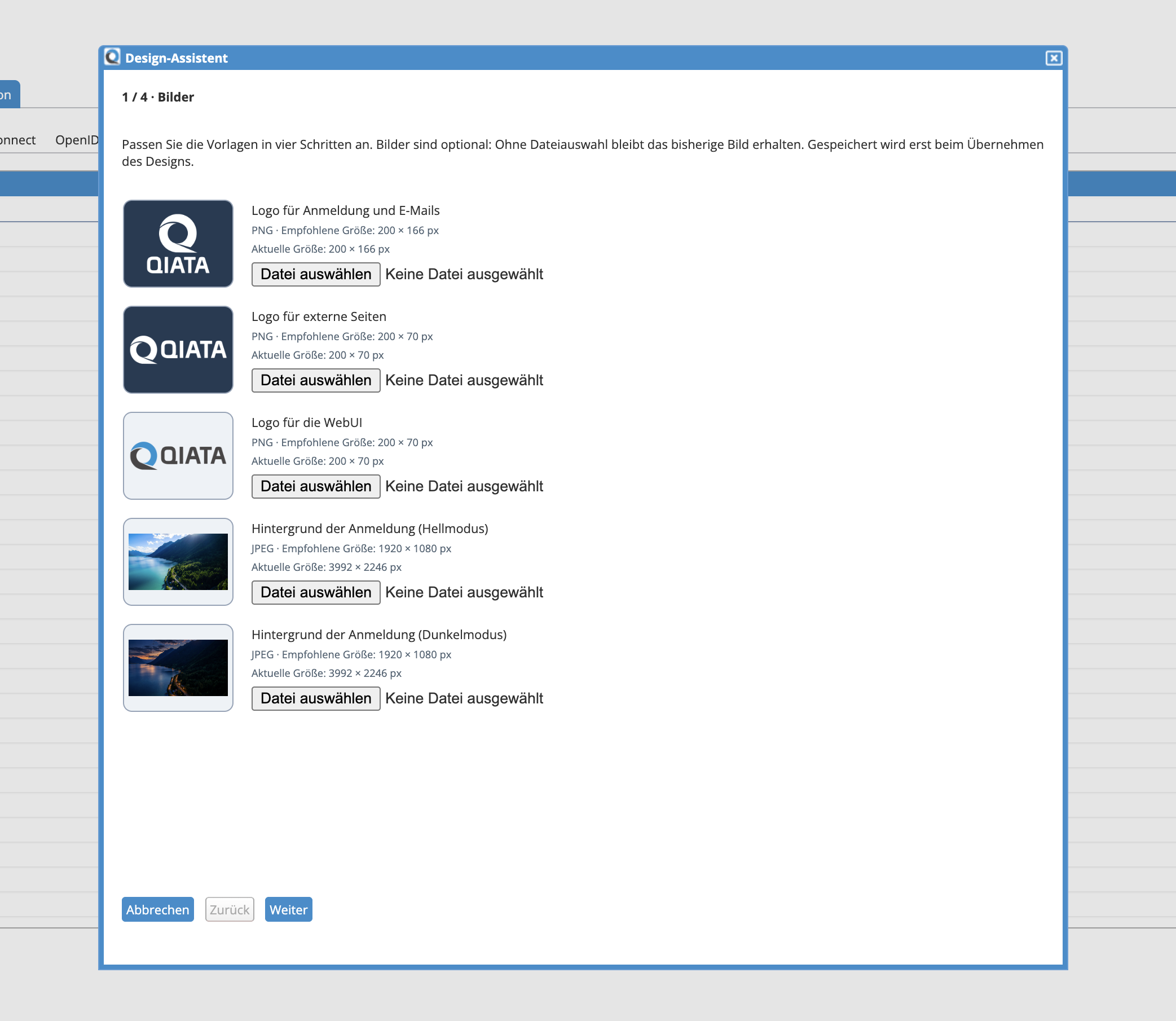
Email templates have also been redesigned. A unified design improves their appearance, while centrally editable headers and footers simplify template maintenance and individual customization.
More Capabilities for Administrators
Qiata 6.0 also introduces numerous improvements to the administration area. Archiving and cleanup operations in particular have been expanded and redesigned for greater clarity and flexibility.
Flexible Archiving and Cleanup
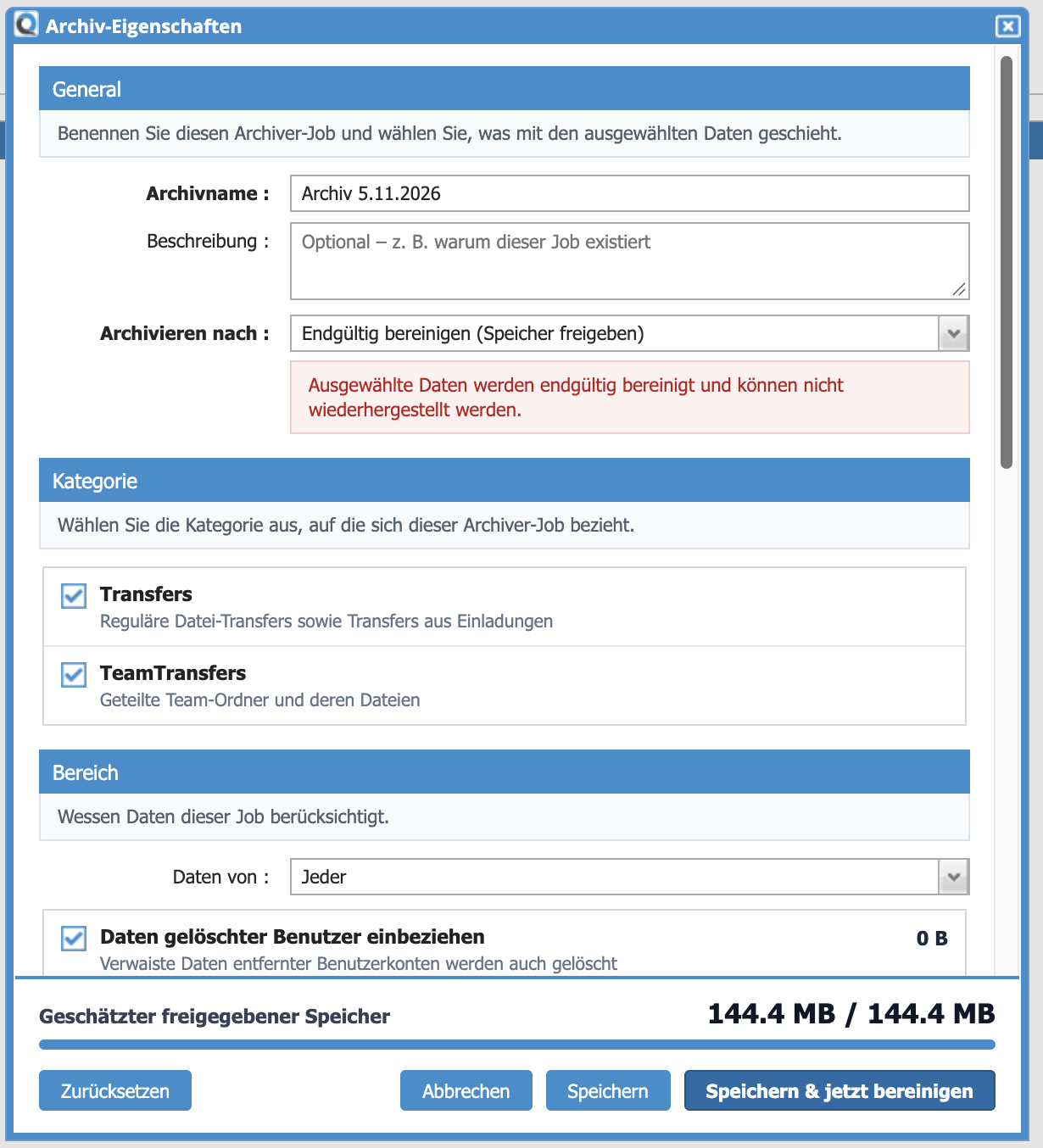
Archiving and cleanup jobs can now be executed immediately or scheduled for a later time. The redesigned archiving interface supports the management of transfers, invitations, and TeamTransfers.
Cleanup jobs can be targeted based on status, age, and user groups. Data belonging to previously deleted users can also be included.
A new preview shows how much storage space will be affected by a cleanup operation, allowing administrators to better assess its impact before execution.
Additional Administrative Enhancements
Administrators can now change the owner of a TeamTransfer. In addition, the handling of unknown transfer recipients in conjunction with Azure and OIDC has been enhanced. If the corresponding directory and group mappings match, these recipients can be created as OIDC users.
Additional Improvements and Optimizations
In addition to the major new features, Qiata 6.0 includes numerous refinements and bug fixes.
- Optimized smartphone layouts for file managers, recipient lists, and dialogs.
- More informative TeamTransfer notifications with references to uploaded or deleted files.
- Improved notifications for paused and expired TeamTransfers.
- Bug fixes related to folder permissions, file operations, and file version retention.
- Improvements to PIN prompts, reminders, and expiration times.
- Bug fixes related to file deletion by the Archiver.
- Updates to the underlying web interface technology and dependencies, along with the removal of obsolete components.
Important Upgrade Information
Qiata 6.00.00 is based on DOMOS 7. Before upgrading, we recommend reviewing the complete release notes and the update instructions applicable to your installation.
After upgrading, we recommend resetting your email templates to apply the new templates and design enhancements. Please back up any individually customized templates beforehand, as resetting them may overwrite your existing modifications.
Discover Qiata 6.0
Explore our release notes for all technical details and changes. If you have any questions about the new version or the upgrade process, our team will be happy to assist you.
